
Meet Nomi: what it does and where to begin
You usually start with something already: a story, a script, or a few frames you want to reference. Nomi takes you from there to a video on a timeline that exports as MP4, and everything along the way lives in one folder on your computer.
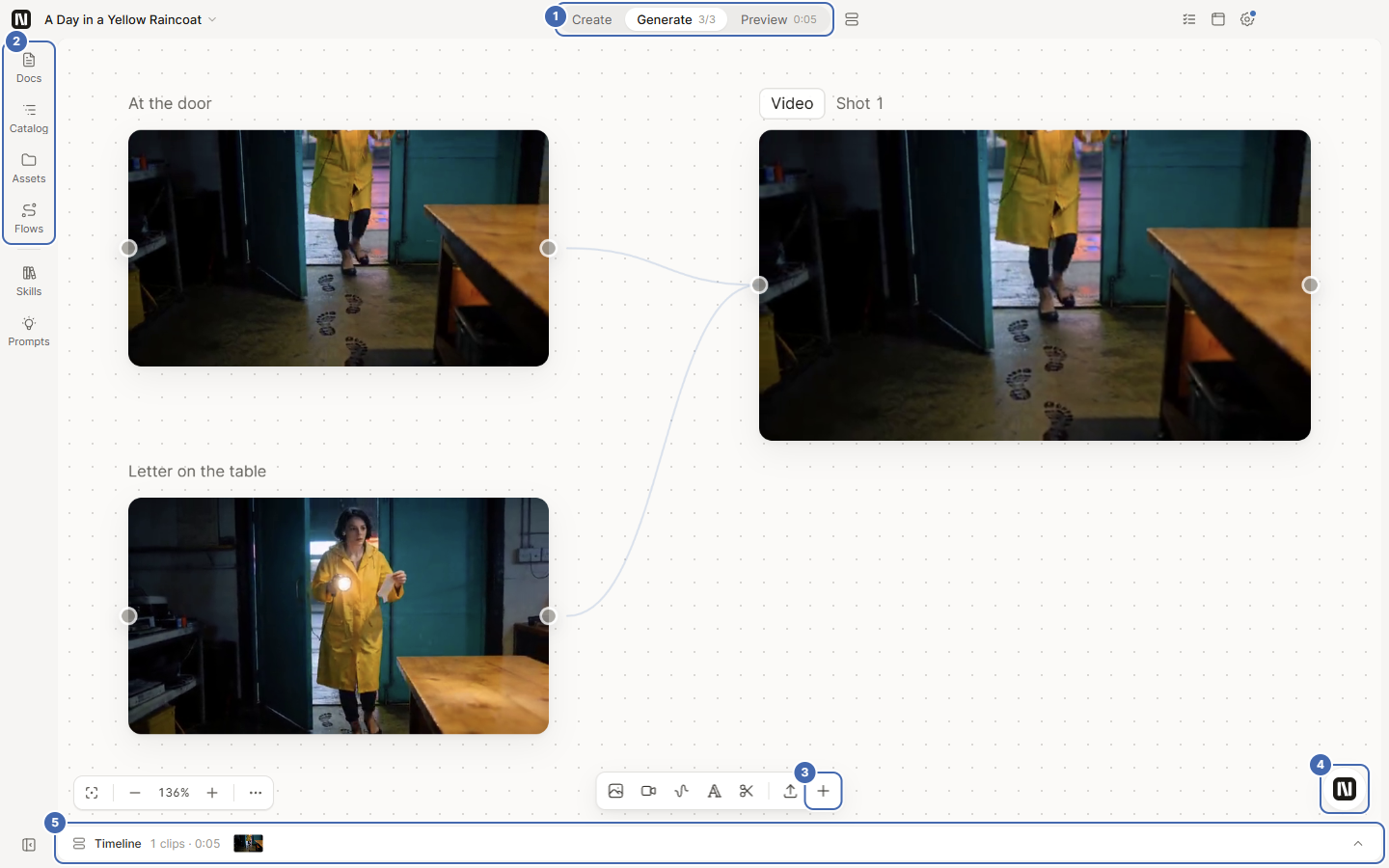
The numbers in the screenshot are the Generate page:
- The three steps in the top bar: Create, Generate, Preview.
- The left rail: docs, catalog, assets, flows.
- The toolbar at the bottom of the canvas: add an image, video, audio, text or edit node, or import files.
- The Agent ball in the bottom right corner. Click it to open the chat panel.
- The timeline strip at the bottom. Expanded, it is the same timeline you see on the Preview page.
What each step is for
Section titled “What each step is for”| Step | What you do here | What you end up with |
|---|---|---|
| Create | Write the story, script or copy, or ask the Agent to write, edit and split it into shots | A document |
| Generate | Place image and video nodes on the canvas, connect references to the next node with lines, and generate | Nodes on the canvas that have pictures on them |
| Preview | Put finished shots on the timeline, check the pacing, add captions and music, and export | An MP4 file |
Who does what
Section titled “Who does what”| You | The Agent | The canvas | |
|---|---|---|---|
| Ideas and choices | Decide what to shoot and which version to keep | Helps turn the idea into shots and edits the document | |
| Doing the work | You can edit any node yourself at any time | Works for you in the panel beside each step: on Create it reads your document, on Generate it looks at the canvas and queues generations, on Preview it reads the timeline | Shows the results where you can see and change them |
| Generations that spend money | You approve | Same on all three levels: it stops and asks before submitting |
The selector at the bottom right of the Agent panel has three levels that decide how often it asks you about changes (generations that spend money are asked on all three):
| Level | How it behaves |
|---|---|
| Ask each step | Edits, generations and plans are all asked first |
| Auto-edit | Document and timeline edits happen directly (the receipt can be undone), and it still asks before generating |
| Full auto | Undoable edits happen directly without asking each time; irreversible actions are still asked every time; it also stops and asks before it spends money |
If you are new, start with the default, Auto-edit.
Where your work lives
Section titled “Where your work lives”A project is a folder on your disk. The canvas, storyboard and timeline are in .nomi/project.json inside it, generated images and videos are under assets/, and exported films are under exports/.
What to prepare first
Section titled “What to prepare first”Nomi does not ship with a model. On first launch the project library shows a banner saying no model is connected to the creative assistant. Click Connect Model on it and follow the next page to connect one model provider before you generate.