Skills · Advertising

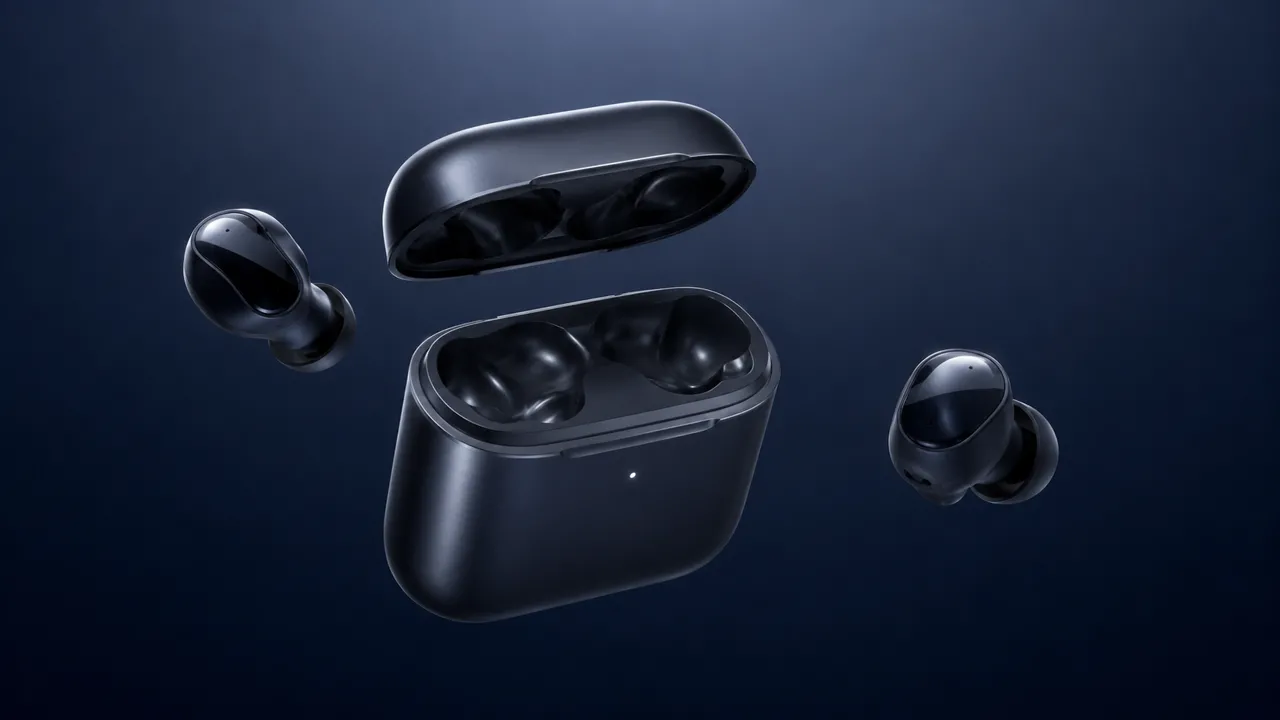
Earbuds, Exploded-View Levitation

Adapt Earbuds, Exploded-View Levitation to the supplied references and check continuity.

  • Works with: video
  • License: CC-BY-4.0

In Nomi

The agent uses it when a task calls for it. You can also open it under Skills on the left and ask the agent to follow it.

In other assistants

It is a standard SKILL.md package. Put the whole folder into the skills directory of an assistant that supports skills, such as Claude Code or Codex.

Earbuds, Exploded-View Levitation
Example output from the upstream repository, not a Nomi test result.

让部件分离展示后归位,保持产品结构。

确认已有参考素材与目标尺寸。缺少决定人物身份、产品外观或故事内容的输入时,先让用户补齐。按下面的原仓配方组织生成描述;把显式槽位替换成用户内容,不虚构品牌。

配方

Wireless earbuds and their charging case float in exploded-view layout against a deep-navy gradient void, lit by one soft overhead box. 0-2s: components drift apart in zero gravity — lid, both buds, and silicone tips suspended and slowly rotating, brushed-metal and matte-plastic surfaces catching crisp specular highlights. 2-4s: a parallax orbit left as a cyan accent edge-light traces every seam, micro-reflections rolling along the glossy stems. 4-6s: the parts magnetically draw back together and seat with a clean close, {品牌名} etched on the hinge. Each part holds constant geometry, scale, and finish — no jitter, duplication, intersection clipping, or warping. Sound: weightless hum, a magnetic click, soft confirmation chime.

验收

核对主体身份、数量、结构、光影和镜头连续性。原仓媒体是配方来源证据,不是 Nomi 本次实测结果。多视角图不保证真实三维几何;生成式修复可能重新绘制细节。完成前展示产物,指出可见偏差。

来源和更改说明见 frontmatter;保留随包许可证。

Pro-grade AI video. Models at their real price.

macOS · Windows · AGPL-3.0 · No account

Download Nomi
Choose the version for this computer

Nomi downloads directly when the platform is known. If the Mac chip cannot be detected reliably, choose the matching installer.

First launch on macOS

The current macOS build is not Apple Developer ID signed or notarized. Only use download links on this site or in the official Nomi GitHub repository.

  1. Download the matching DMG and drag Nomi to Applications.
  2. In Finder, right-click Nomi in Applications, choose Open, then confirm Open.
  3. If it is still blocked, open System Settings → Privacy & Security, find Nomi, and click Open Anyway.

Only if macOS says Nomi is “damaged”: confirm the installer came from an official link above, then open Terminal and run:

xattr -dr com.apple.quarantine "/Applications/Nomi.app"

You do not need to disable Gatekeeper globally, and should not do so.